Research, Enrichment, and Routing
Research, Enrichment, and Routing
YouEx.ai includes AI-assisted workflows to help you qualify and work records more effectively.
Research and enrichment run on Leads, Contacts, and Companies. Use them before outreach so your message is grounded in real context.
Research
Research adds contextual information that can improve:
- personalization
- qualification
- account understanding
- message quality
A completed research run typically leaves:
- a full research report with sectioned findings
- an executive summary for a quick scan
- source links back to the evidence
- a completion timestamp you can refresh later
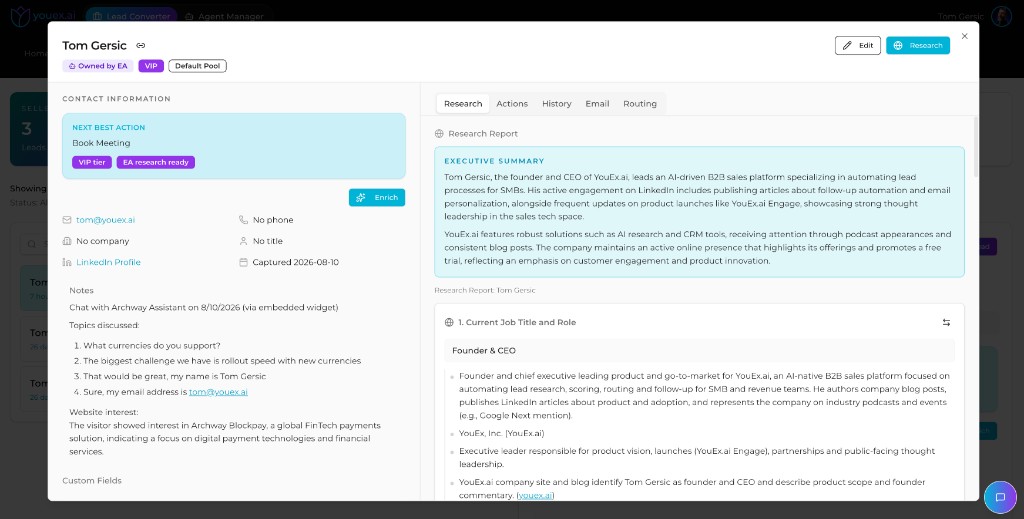
Use research when:
- you need more context before first outreach
- the company is unfamiliar
- the lead needs a more tailored message
- you are expanding from one contact into the broader buying committee
Research can start automatically when leads enter the workflow, or on demand from the record. Either way it runs in the background so you can keep working.
Enrichment
Enrichment helps fill in missing contact and firmographic data.
Use enrichment when:
- email or phone data is incomplete
- company data is sparse
- you need a more complete record before follow-up
Enrichment is designed to fill gaps and add fields. It should not overwrite trusted primary data your team already validated.
Routing and scoring
Some records include scoring, tiering, and routing signals.
These help indicate:
- urgency
- likely ownership
- expected follow-up motion
As an end user, use these signals as guidance, not blind instruction. If they repeatedly look wrong, raise the pattern with an administrator.
Administrators configure pools and tier playbooks in Agent Manager. See Revenue Agent Operations.
Best practice
The strongest workflow is:
- research for context
- enrich for data completeness
- review routing or tier signals
- write or send the next message
- map related contacts when the deal needs more than one thread